Retargeting Exclusions: When to Stop Showing Ads to Converted Users
Master retargeting exclusions on Meta Ads. Learn when and how to stop showing ads to converted users to save budget and improve campaign performance.
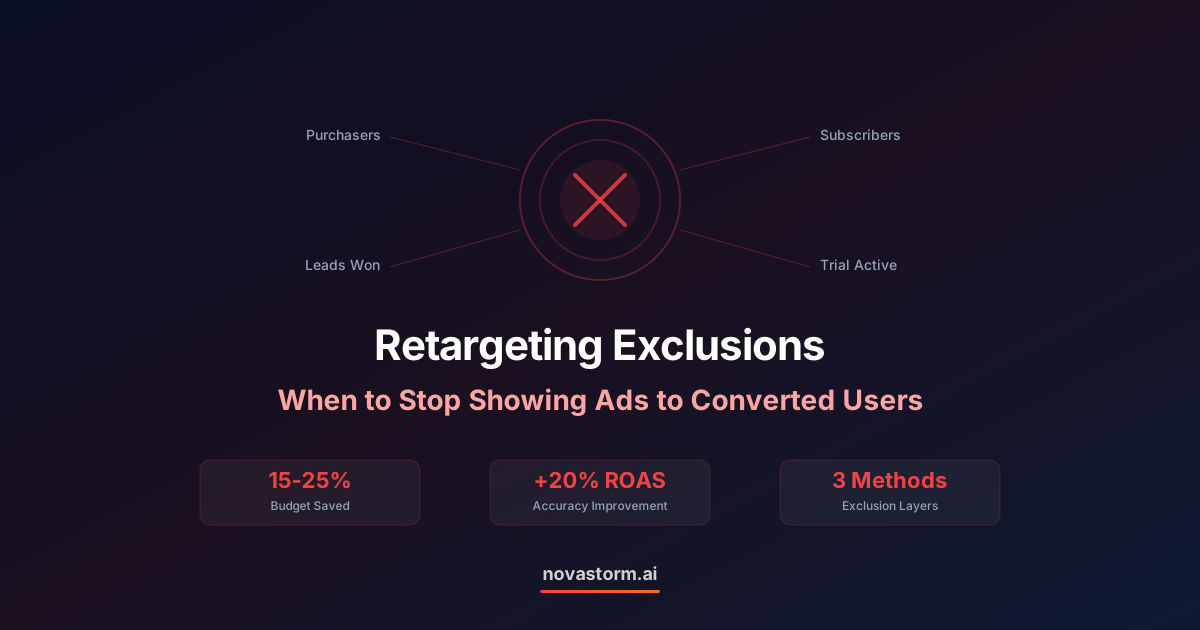
Nothing frustrates a customer more than seeing ads for something they already bought. Yet millions of ad dollars are wasted every month because advertisers fail to implement proper retargeting exclusions. Knowing when to stop showing ads to converted users is just as important as knowing when to start showing them.
Retargeting exclusions protect your budget, your brand reputation, and your customer relationships. They ensure that every impression goes to someone who can still be influenced, rather than someone who already took the desired action. Getting exclusions right can reduce wasted spend by 15-25% while improving the overall health of your Meta Ads account.
The True Cost of Not Excluding Converters
When you fail to apply retargeting exclusions, you pay in three ways. First, you waste direct ad spend on impressions served to people who cannot convert again, at least not immediately. Second, you inflate your frequency metrics, which tells Meta's algorithm that your ads are not resonating. Third, you create a negative brand experience that can lead to ad fatigue, complaints, or even ad blocking.
| Impact Area | Without Exclusions | With Proper Exclusions |
|---|---|---|
| Wasted Spend | 15-25% of retargeting budget | Near zero waste |
| Effective Frequency | Diluted across converters | Concentrated on prospects |
| Brand Perception | Risk of annoyance | Positive, relevant experience |
| ROAS | Understated by 10-20% | Accurate measurement |
| Algorithm Learning | Confused by mixed signals | Clean conversion data |
Types of Retargeting Exclusions on Meta
Meta offers several mechanisms for implementing retargeting exclusions. The right choice depends on your conversion type, sales cycle, and whether you want to suppress all ads or just acquisition-focused ads.
Pixel-Based Exclusions
The most common approach uses Meta Pixel events. Create a custom audience of users who triggered your conversion event (Purchase, Lead, CompleteRegistration) and exclude that audience from your retargeting ad sets. Set an appropriate lookback window based on your product's repurchase cycle.
Customer List Exclusions
Upload your customer database as a custom audience and exclude it from acquisition campaigns. This catches conversions that may have happened offline or through channels that your pixel does not track. Update the list weekly or automate the sync through a CRM integration.
Offline Event Exclusions
For businesses with offline conversions like in-store purchases or phone orders, use the Conversions API to send offline events to Meta. These events can then be used to build exclusion audiences, ensuring that customers who converted through any channel are properly excluded.
Pixel-based exclusions only capture conversions that happen on your tracked web properties. If you have significant offline or cross-device conversions, relying solely on pixel exclusions will leave gaps. Layer multiple exclusion methods for comprehensive coverage.
When to Exclude vs When to Keep Retargeting
Not every conversion warrants a permanent exclusion. The decision depends on your business model, product type, and customer lifecycle. Retargeting exclusions should be strategic, not blanket.
Stop wasting ad budget
NovaStorm AI cuts Meta Ads CPA by 40% on average. Start free.
| Scenario | Exclusion Strategy | Duration |
|---|---|---|
| One-time purchase (e.g., annual subscription) | Full exclusion from acquisition ads | Until renewal window opens |
| Repeat purchase (e.g., consumables) | Exclude for repurchase cycle period | 14-60 days based on product |
| Lead generation (e.g., demo booked) | Exclude from lead gen, add to nurture | Until sales cycle completes |
| Free trial signup | Exclude from signup ads, retarget for upgrade | Duration of trial period |
| Content download | Exclude from same offer, retarget for next step | 7-14 days |
| E-commerce purchase | Exclude from same product, show complementary | Based on product category |
Setting Up Exclusion Windows Correctly
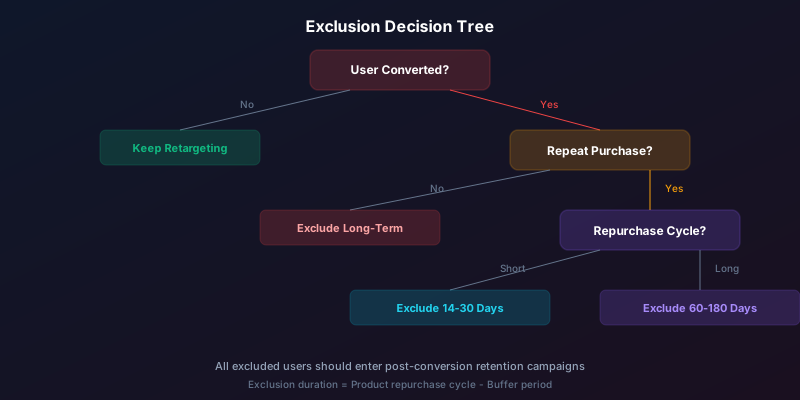
The exclusion window duration directly impacts both waste prevention and opportunity capture. Set it too short and converters start seeing acquisition ads again before they are ready. Set it too long and you miss legitimate repeat purchase opportunities.
- SaaS with monthly billing: Exclude for 30 days after signup, then target with upgrade or referral ads
- E-commerce with 45-day average repurchase cycle: Exclude for 30 days, then re-enter the retargeting pool
- High-ticket services: Exclude for 90-180 days or until the service engagement ends
- Lead generation: Exclude until the lead is marked as closed-won or closed-lost in your CRM
- Event registrations: Exclude from registration ads immediately, shift to event reminder ads
Post-Conversion Retargeting Strategy
Excluding converters from acquisition campaigns does not mean you stop advertising to them entirely. Smart advertisers shift converted customers into separate campaigns designed for retention, cross-sell, upsell, or referral objectives.
Create dedicated post-conversion ad sets that serve different messaging. A customer who just purchased should see onboarding content or complementary product suggestions, not the same acquisition ad that convinced them to buy. This approach respects the customer relationship while continuing to generate value from the audience.
Build a post-conversion exclusion and inclusion system simultaneously. As you exclude converters from acquisition campaigns, automatically include them in retention campaigns. This creates a seamless transition from prospect to customer experience within your ad account.
Automating Retargeting Exclusions
Manual exclusion management becomes unmanageable at scale. When you run dozens of campaigns across multiple products or services, keeping exclusion audiences current and correctly applied requires constant attention. Missed exclusions silently drain budget every day they go unnoticed.
Automated systems can sync customer lists in real time, monitor for missing exclusions across campaigns, alert you when new ad sets launch without proper exclusions, and calculate the budget impact of any gaps. This operational layer ensures that your retargeting exclusions remain airtight as your account scales.

Retargeting exclusions represent one of the highest-ROI optimizations you can make. They require no additional creative, no new audiences, and no increased budget. They simply redirect existing spend from wasted impressions to valuable ones. Implement them thoroughly, review them regularly, and automate their management to ensure every retargeting dollar works toward a conversion that can actually happen.
Novastorm AI automates Meta Ads routine — from monitoring to optimization. Learn more at novastorm.ai
Disclaimer: This article was generated with the assistance of AI and reviewed by the NovaStorm AI team. While we strive for accuracy, we recommend verifying specific data points and consulting official sources (linked where available) for critical business decisions.
Ready to automate your Meta Ads?
NovaStorm AI takes full responsibility for your campaigns — from monitoring to optimization.
Get Started FreeRelated Articles
Abandoned Cart Email and Meta Ad Retargeting: Combined Recovery
Combine abandoned cart emails with Meta Ad retargeting to recover up to 30% of lost revenue. Build a multi-channel cart recovery system that converts.
Meta Ads Not Spending Budget: Diagnosis and Fix Guide
Discover why your Meta Ads are not spending budget and how to fix delivery issues. Step-by-step diagnosis guide covering bid strategy, audience, and creative fixes.
Diminishing Returns in Meta Ads: Finding the Spend Sweet Spot
Learn how to identify diminishing returns in Meta Ads and find the optimal spend level where your budget delivers maximum efficiency without wasting ad dollars.