Managing Multiple Ad Accounts: Agency Best Practices
Agency best practices for managing multiple Meta Ad accounts including Business Manager setup, naming conventions, team permissions, cross-account reporting, and client onboarding.
The Challenge of Managing Multiple Ad Accounts at Agency Scale
Managing multiple ad accounts agency operations demand is one of the most complex operational challenges in digital marketing. When you are responsible for five clients, things are manageable. When you hit twenty, fifty, or a hundred accounts, every inefficiency compounds into hours of wasted time and increased risk of costly mistakes. The difference between agencies that scale profitably and those that drown in operational chaos comes down to systems: how accounts are structured, how teams access them, how campaigns are named, and how performance is reported.
This guide covers the foundational systems that successful agencies build to manage Meta Ad accounts at scale. Whether you are a growing agency or an established one looking to tighten operations, these practices will reduce errors, speed up workflows, and make onboarding both team members and clients significantly smoother.
Business Manager Architecture
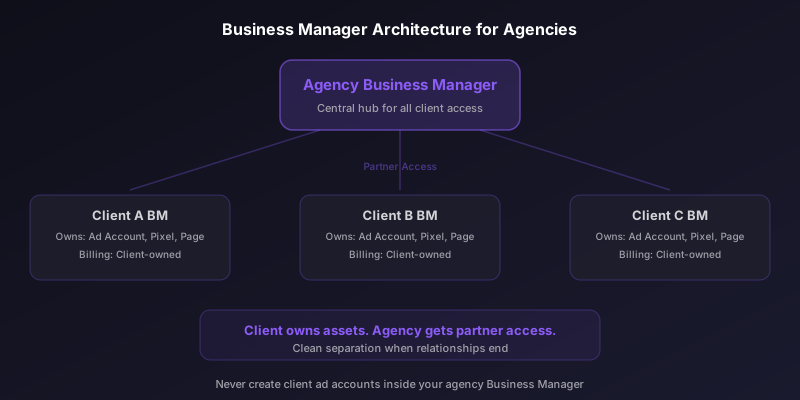
Meta Business Manager is the organizational layer that contains ad accounts, pages, pixels, and team access. For agencies, the correct architecture is to have one agency Business Manager that requests access to client Business Managers. Never own client ad accounts inside your agency Business Manager. When the relationship ends, you want a clean separation.
- Create one central agency Business Manager for your organization.
- Each client should have their own Business Manager that owns their ad accounts, pixels, and pages.
- Request partner access from the client Business Manager to your agency Business Manager.
- Assign ad accounts and assets through the partner relationship, not by adding individuals.
- If a client does not have a Business Manager, help them create one before starting work.
Never create ad accounts inside your agency Business Manager for client work. If the client relationship ends, transferring ad account ownership is difficult and sometimes impossible. The client should always own their own assets.
Naming Conventions at Scale
Naming conventions are the single most important operational system for multi-account management. Without consistent naming, analyzing performance across accounts becomes a manual nightmare, handoffs between team members create confusion, and automations break.
Establish a naming convention that includes all the information someone needs to understand a campaign at a glance without opening it. The convention should be hierarchical, going from broad to specific.
Campaign Level
Format: [Client Code] | [Objective] | [Funnel Stage] | [Date Launched]
Example: ACME | Conversions | TOF-Prospecting | 2026-02
Ad Set Level
Format: [Audience Type] | [Audience Detail] | [Placement] | [Geo]
Example: LAL | 1%-Purchasers-180d | Auto | US
Ad Level
Format: [Creative Type] | [Concept Name] | [Variation] | [CTA]
Example: Video | ProductDemo-V2 | 15sec | ShopNow
Use pipe (|) as a delimiter rather than hyphens or underscores. Pipes are visually distinct and do not conflict with other naming elements. Document your naming convention in a shared reference guide and enforce it during campaign reviews.
Stop wasting ad budget
NovaStorm AI cuts Meta Ads CPA by 40% on average. Start free.
Team Roles and Permissions
Access management becomes critical as your team grows. Not every team member needs full admin access to every client account. Meta Business Manager offers several permission levels that should be assigned based on role.
| Role | Business Manager Access | Ad Account Access | Typical Team Members |
|---|---|---|---|
| Admin | Full control | All accounts | Agency owners, operations leads |
| Campaign Manager | Employee access | Assigned accounts only | Media buyers, campaign managers |
| Analyst | Employee access | View and report only | Data analysts, reporting team |
| Creative | Limited | No ad account access | Designers working on ad assets |
| Client Liaison | Limited | View only on their accounts | Account managers, client contacts |
Review permissions quarterly. When team members leave the agency or change roles, update their access immediately. Stale permissions create security risks and potential for unauthorized changes.
Cross-Account Reporting
Reporting across multiple accounts is where most agencies spend excessive time. Meta Ads Manager is designed for single-account management, making cross-account analysis cumbersome. Build a reporting system that aggregates data efficiently.
- Use Meta's reporting tool with saved report templates that match your naming conventions.
- Build automated dashboards using tools like Supermetrics, Funnel, or the Meta Marketing API.
- Standardize the metrics you report on across all clients to enable benchmarking.
- Create a weekly agency scorecard that shows all accounts on a single page.
- Automate data pulls so reporting time is spent on analysis, not data collection.
Template Campaigns
Building every campaign from scratch is wasteful at scale. Create template campaigns for common scenarios and duplicate them when launching new clients or campaign types. Templates should include your standard campaign structure, naming conventions, tracking parameters, and budget allocation frameworks.
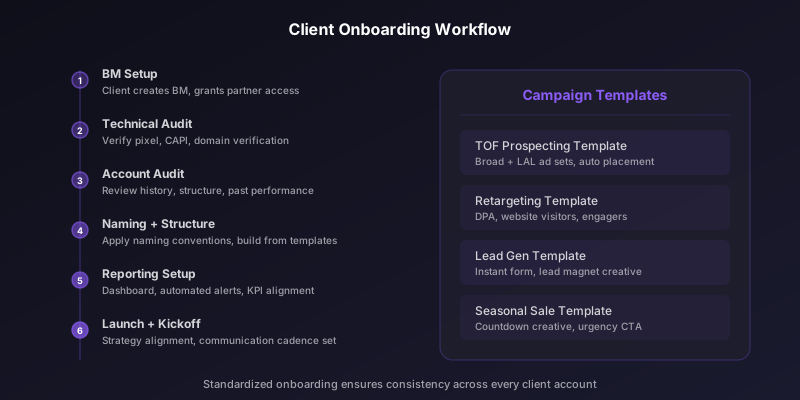
Common templates include a prospecting campaign template with broad and lookalike ad sets, a retargeting campaign template with dynamic product ads, a lead generation template with instant form configuration, and a seasonal sale template with countdown creative and urgency messaging.
Client Onboarding Workflow
A standardized onboarding process ensures nothing is missed when bringing on a new client. Create a checklist that every new account goes through.
- Client creates their own Business Manager if they do not have one.
- Client grants partner access to your agency Business Manager.
- Verify pixel installation and configure Conversions API.
- Audit existing account structure and historical performance.
- Set up naming conventions in the account.
- Configure automated rules for budget pacing and anomaly alerts.
- Build initial campaign structure from templates.
- Set up reporting dashboard with agreed-upon KPIs.
- Schedule kickoff call to align on strategy and communication cadence.
Billing Management
Billing across multiple accounts requires careful management. Each ad account has its own payment method and billing threshold. For agencies, the cleanest setup is to have clients own their own billing, with their payment method attached to their ad account.
If your agency pays on behalf of clients and invoices them, maintain meticulous records of spend per account. Use Meta's billing reports to reconcile spend, and set up spend alerts to catch runaway budgets before they become billing disputes. Document your billing arrangement clearly in your agency agreement to avoid misunderstandings.
Agencies that let clients own their billing have cleaner relationships and fewer financial disputes. The agency manages strategy and execution, while the client maintains direct financial control. This also eliminates cash flow issues from fronting ad spend.
Scaling Without Chaos
The agencies that scale successfully are the ones that invest in operational infrastructure before they need it. Build your naming conventions, permission structures, reporting systems, templates, and onboarding checklists when you have ten clients, not when you have fifty. The time invested in systems pays compound returns as every new client benefits from the infrastructure that is already in place.
Novastorm AI automates Meta Ads routine — from monitoring to optimization. Learn more at novastorm.ai
Disclaimer: This article was generated with the assistance of AI and reviewed by the NovaStorm AI team. While we strive for accuracy, we recommend verifying specific data points and consulting official sources (linked where available) for critical business decisions.
Ready to automate your Meta Ads?
NovaStorm AI takes full responsibility for your campaigns — from monitoring to optimization.
Get Started FreeRelated Articles

The Psychology of Color in Meta Ad Creative
Explore the psychology of color in Meta Ad creative. Learn how color associations, contrast, CTA button colors, and cultural meanings impact ad performance.

Dayparting in Meta Ads: Does Time-of-Day Targeting Still Work
Explore whether dayparting in Meta Ads still works in the age of algorithmic optimization. Learn when time-of-day targeting helps, when to avoid it, and how to analyze time performance.
Meta Ads for App Install Campaigns: Complete Strategy Guide
Complete guide to Meta Ads app install campaigns covering SDK setup, deep linking, creative strategies, cost per install benchmarks, and retention optimization.