Dayparting in Meta Ads: Does Time-of-Day Targeting Still Work
Explore whether dayparting in Meta Ads still works in the age of algorithmic optimization. Learn when time-of-day targeting helps, when to avoid it, and how to analyze time performance.
What Dayparting Meta Ads Really Means Today
Dayparting Meta Ads refers to the practice of scheduling your ads to run only during specific hours of the day or days of the week. The concept originates from traditional broadcast advertising, where different time slots commanded different rates because viewer demographics shifted throughout the day. In digital advertising, and specifically on Meta, dayparting has a more complicated relationship with performance. The algorithm that delivers your ads already considers timing as one of many signals in its optimization. The question is whether manual scheduling adds value on top of what the algorithm already does.
The honest answer is that dayparting helps in some situations and hurts in others. Understanding when to use it and when to leave timing to the algorithm is the difference between saving budget and strangling your campaign's potential.
How Meta Already Handles Timing
Meta's delivery algorithm is aware of time. It knows when specific users are most likely to engage and convert based on their historical behavior patterns. If a particular user consistently shops online at 9 PM, the algorithm learns this and is more likely to show them conversion-focused ads during that window. This happens automatically, with no dayparting configuration needed.
When you set up dayparting, you override this natural optimization. You are telling Meta to stop delivering during hours that the algorithm might otherwise find valuable. In many cases, this means you are leaving conversions on the table, especially if your audience spans multiple time zones or has varied daily routines.
Meta's algorithm does not distribute budget evenly across all hours. It naturally spends more during high-performance periods and less during low-performance ones. This built-in time optimization is often more effective than manual dayparting because it operates at the individual user level rather than broad time blocks.
When Dayparting Helps
Despite the algorithm's capabilities, there are legitimate scenarios where manual dayparting improves results.
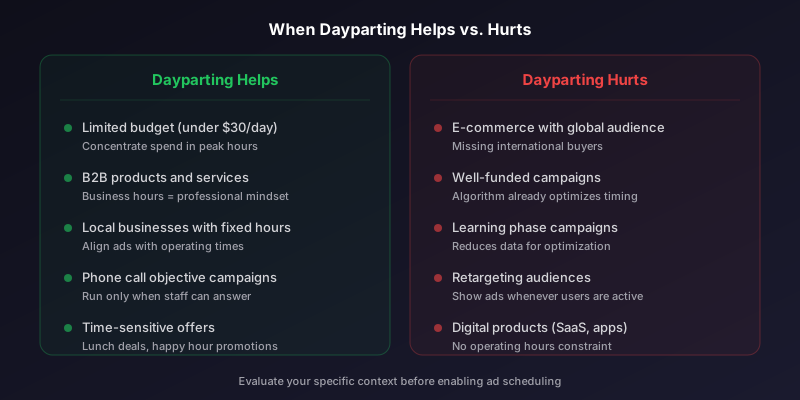
Limited Budget Scenarios
If your daily budget is small relative to your audience size, the algorithm may spread spend too thin across the full day. Concentrating your budget into peak hours ensures that you have enough budget density to compete effectively in auctions. A $20 per day campaign might perform better running 12 hours than 24 hours because it can bid more competitively during those 12 hours.
B2B Advertising
B2B campaigns often see dramatic performance differences between business hours and evenings or weekends. Decision-makers browsing Meta at 10 AM on a Tuesday are in a different mindset than the same person scrolling at 11 PM on a Saturday. If your product requires a professional context for the ad to resonate, dayparting to business hours can significantly improve quality metrics.
Local Businesses
Restaurants, retail stores, and service businesses with fixed operating hours benefit from dayparting. There is no value in running ads for a restaurant at 3 AM when it opens at 11 AM. Aligning ad delivery with business hours ensures that users who engage can actually take the desired action.
When to Avoid Dayparting
In many common scenarios, dayparting does more harm than good.
Stop wasting ad budget
NovaStorm AI cuts Meta Ads CPA by 40% on average. Start free.
- E-commerce with global audiences: Customers shop at all hours. Restricting delivery means missing international buyers in different time zones.
- Well-funded campaigns: If your budget is adequate for your audience size, the algorithm allocates spend to high-performing hours naturally.
- Campaigns in the learning phase: Restricting delivery hours reduces the data volume available for optimization, extending or preventing exit from the learning phase.
- Always-on digital products: SaaS tools, apps, and subscription services have no operating hours. Users convert whenever they are ready.
- Retargeting campaigns: Users in your retargeting audience should see your ads whenever they are on the platform, not only during your chosen hours.
How to Analyze Time Performance
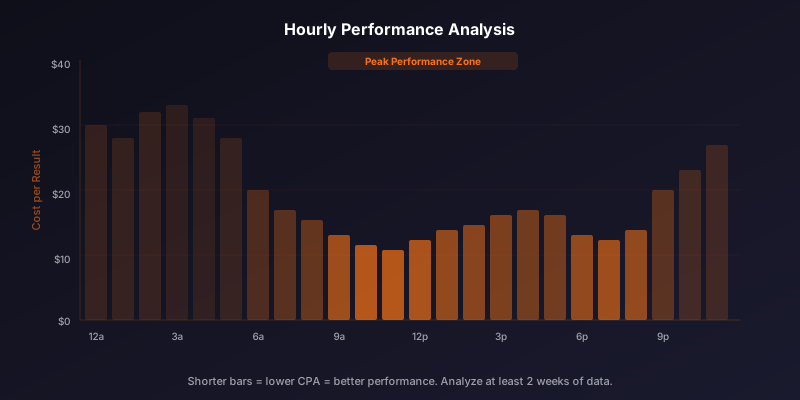
Before implementing dayparting, analyze your existing data to see if there are meaningful performance differences by time of day. In Ads Manager, use the Breakdown feature to view results by time of day or day of week.
- Go to Ads Manager and select your campaign.
- Click the Breakdown dropdown and select By Time of Day (Ad Account Time Zone).
- Look at cost per result, conversion rate, and ROAS across different hours.
- Run the same analysis by Day of Week to identify weekly patterns.
- Compare at least two weeks of data to avoid drawing conclusions from noise.
- Calculate the statistical significance of any differences you observe.
Do not confuse correlation with causation in time-of-day data. Low performance at 3 AM might simply reflect low competition and low volume, not a bad time to advertise. The cost per result might actually be lower during off-peak hours even if total volume is low.
Setting Up Ad Scheduling
If your analysis supports dayparting, Meta offers ad scheduling at the ad set level. Note that ad scheduling requires using lifetime budgets rather than daily budgets. This is an important constraint because it changes how Meta paces your spending.
To set up scheduling, create or edit an ad set and select lifetime budget. Then use the ad scheduling section to define which hours and days you want your ads to run. You can set different schedules for different days of the week, allowing for nuanced configurations like running all day on weekdays but only mornings on weekends.
Time Zone Considerations
Ad scheduling in Meta uses the ad account's time zone, not the user's time zone. This is a critical distinction. If your ad account is set to Eastern Time and you schedule ads from 9 AM to 5 PM, a user in California will only see your ads from 6 AM to 2 PM their local time. For advertisers targeting a single time zone, this is straightforward. For those targeting nationally or internationally, it creates significant gaps in coverage.
If you need precise time-zone-specific scheduling, create separate ad sets for each major time zone in your target geography. Each ad set targets the geographic region and uses scheduling adjusted for the account time zone to align with the desired local hours.
A Practical Framework
Rather than defaulting to dayparting or avoiding it entirely, use this decision framework.
| Condition | Recommendation |
|---|---|
| Budget under $30/day | Consider dayparting to concentrate spend |
| B2B product | Test business hours vs. 24/7 delivery |
| Local business with hours | Daypart to operating hours plus 2 hours before |
| E-commerce, global audience | Do not daypart. Let the algorithm optimize. |
| Campaign in learning phase | Do not daypart. Maximize data collection. |
| Strong time-of-day data pattern | Test dayparting with A/B experiment |
| No clear time pattern in data | Do not daypart. No evidence supports it. |
The bottom line is that dayparting is a precision tool, not a default setting. Use it when your data and business context clearly support it, and trust the algorithm when they do not. The trend in Meta Ads optimization is toward giving the algorithm more freedom, not less, and dayparting is one of the constraints that should be applied thoughtfully rather than habitually.
Novastorm AI automates Meta Ads routine — from monitoring to optimization. Learn more at novastorm.ai
Disclaimer: This article was generated with the assistance of AI and reviewed by the NovaStorm AI team. While we strive for accuracy, we recommend verifying specific data points and consulting official sources (linked where available) for critical business decisions.
Ready to automate your Meta Ads?
NovaStorm AI takes full responsibility for your campaigns — from monitoring to optimization.
Get Started FreeRelated Articles
Meta Ads for Startups: Budget-Friendly Scaling Strategies
Learn proven Meta Ads for startups strategies that maximize growth on limited budgets. Scale from $500 to $5K/mo with data-driven ad campaigns.

Audience Overlap in Meta Ads: How to Diagnose and Fix It
Learn how to diagnose and fix audience overlap in Meta Ads. Understand real impact on performance, check overlap in Ads Manager, and consolidate effectively.
Exclusion Audiences: Stop Wasting Budget on Wrong People
Learn how exclusion audiences in Meta Ads reduce CPA and stop budget waste. Setup checklist for customer, converter, and frequency-based exclusions included.