Instagram Shopping Ads: Product Tagging Best Practices
Learn product tagging best practices for Instagram Shopping Ads. Discover catalog requirements, creative optimization, and strategies to boost conversion rates from tagged products.
Instagram Shopping Ads product tagging has transformed the way e-commerce brands connect with buyers on social media. Instead of forcing users through a clunky funnel of link clicks and landing pages, tagged products let shoppers tap, explore, and purchase without ever leaving the Instagram experience. When done right, this shortens the path to purchase dramatically and lifts conversion rates across the board.
Why Instagram Shopping Ads Product Tagging Matters
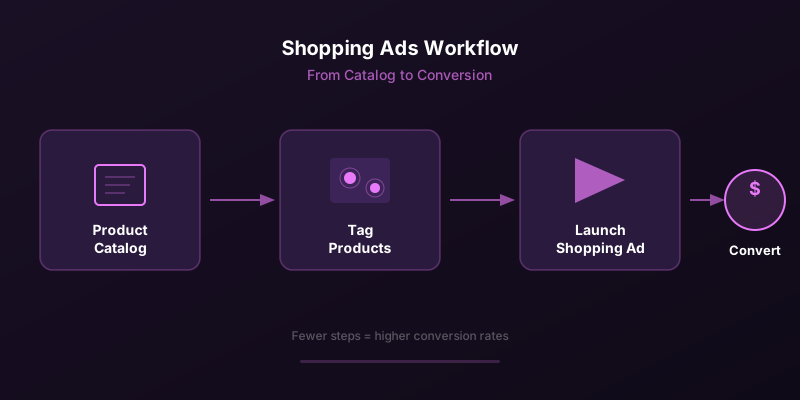
Traditional ad formats on Meta rely on a single call-to-action that sends users to an external website. Shopping Ads flip this model by embedding product information directly within the ad creative. Users can see pricing, product names, and descriptions in-app before deciding to visit your store. This reduces friction and pre-qualifies traffic, meaning the visitors who do land on your site are far more likely to convert.
The difference between discovery and intent is critical here. Many Instagram users are scrolling in a discovery mindset, browsing for inspiration rather than searching for a specific item. Product tags bridge that gap. They transform passive browsing into active consideration by providing just enough product context to spark interest.
Setting Up Your Product Catalog
Before you can tag products in ads, you need a properly configured product catalog in Meta Commerce Manager. This is the foundation of your entire Shopping Ads strategy, and cutting corners here will create problems downstream.
Catalog Requirements
- Product images must be at least 500x500 pixels with a white or clean background for the primary image
- Titles should be descriptive but concise, ideally under 65 characters, and include the product type and key attributes
- Descriptions need to be accurate and compelling, with 1000 characters maximum
- Pricing must match your website exactly, including currency and sale prices
- Availability status must update in real time to avoid showing out-of-stock items
- Product categories should follow Meta's taxonomy for better ad delivery
- GTIN, MPN, or brand identifiers improve matching and catalog quality scores
Use a data feed management tool to automate catalog updates. Manual uploads quickly become unsustainable once your catalog exceeds a few hundred products, and stale data leads to disapproved ads and poor user experiences.
Product Tagging Strategy for Ads
How and where you place product tags in your ad creative directly impacts performance. Poorly placed tags obscure the product or create visual clutter, while well-placed tags guide the viewer's eye naturally from the creative to the product information.
Tag Placement Guidelines
| Placement | Best Practice | Common Mistake |
|---|---|---|
| Single Product Image | Tag centered on the product, slightly below center | Tag placed at the very edge where it gets cropped |
| Multi-Product Image | Tag each product individually, spaced evenly | Overlapping tags that confuse the viewer |
| Lifestyle Image | Tag products where they appear naturally in the scene | Tagging items that are too small or partially hidden |
| Video Content | Use product tags in the first 3 seconds and final frame | Tagging only at the end when most viewers have dropped off |
| Carousel Cards | One primary tag per card, featured product prominent | Overloading a single card with too many tags |
Limit yourself to three to five product tags per creative. Research consistently shows that ads with fewer, more intentional tags outperform those that try to showcase an entire catalog in a single image. The goal is to highlight your best sellers or highest-margin products, not overwhelm the viewer.
Creative Optimization for Shopping Ads
The creative itself must work harder in Shopping Ads because it serves a dual purpose: capturing attention and presenting products in a way that encourages tapping. Unlike standard ads where the creative just needs to stop the scroll and drive a click, Shopping Ads need to make the product look desirable enough that users engage with the tags.
- Use high-resolution lifestyle imagery that shows the product in context rather than on a plain background
- Ensure lighting is consistent and products are clearly visible even on mobile screens
- Include subtle visual cues that draw attention to tagged products, such as contrast or negative space
- Test both static images and short video clips to find what resonates with your audience
- Create seasonal and themed variations to maintain freshness and relevance
Stop wasting ad budget
NovaStorm AI cuts Meta Ads CPA by 40% on average. Start free.
Collection Ads and Shopping
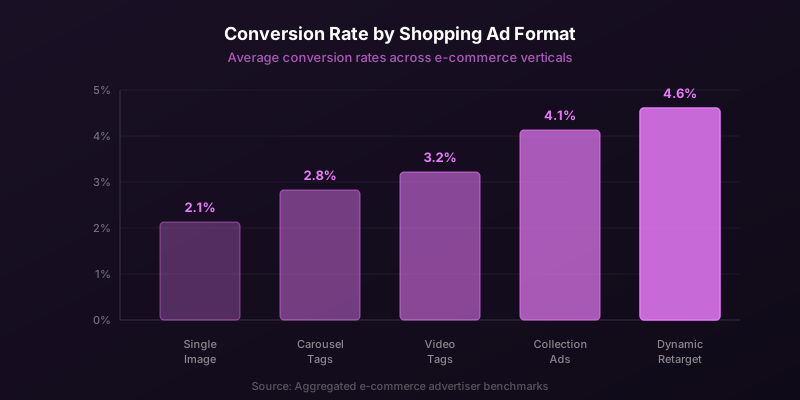
Collection Ads are a powerful extension of the Shopping format. They pair a hero image or video with a grid of product thumbnails below, creating a mini storefront within the ad. When a user taps, they enter an Instant Experience that loads instantly and showcases your products in a fullscreen, immersive format.
The key to effective Collection Ads is curating the product set. Rather than pulling from your entire catalog, create themed collections around specific use cases, occasions, or style categories. A home decor brand might build a collection around a living room scene, while a fashion brand could curate a complete outfit. This contextual bundling increases average order value by encouraging multi-product purchases.
Discovery vs. Intent Audiences
Your Shopping Ads strategy should differ based on where the audience sits in the funnel. For top-of-funnel discovery audiences, use broad product sets with aspirational lifestyle imagery. The goal is to introduce your brand and catalog to new potential customers. For mid and bottom-funnel intent audiences, use dynamic product ads that retarget based on specific products viewed or added to cart.
Brands that separate their Shopping Ads into discovery and retargeting campaigns typically see 30 to 40 percent higher return on ad spend compared to those running a single combined campaign. The messaging, creative, and product selection should differ for each stage.
Conversion Rate Optimization
Driving taps on product tags is only half the battle. The post-tap experience determines whether those taps translate into sales. Once a user taps a product tag, they see a product detail page within Instagram. This page pulls information directly from your catalog, which is why catalog quality is so important.
- Ensure product pages load quickly and display accurate pricing and availability
- Use multiple product images in your catalog so the in-app product page feels rich and complete
- Write compelling product descriptions that address common objections and highlight key benefits
- Enable checkout on Instagram where available to keep the entire purchase within the app
- Monitor your catalog diagnostics regularly for errors, warnings, or quality issues
Measuring Shopping Ads Performance
Standard metrics like click-through rate and cost per click still apply, but Shopping Ads introduce additional metrics worth tracking. Product page views, add-to-cart events from product detail pages, and content views per product tag give you granular insight into how users interact with your tagged products.
Pay close attention to the gap between product tag taps and website visits. A high tap rate with low follow-through suggests your catalog information is not compelling enough, or there is a disconnect between the ad creative and the product details. Conversely, high follow-through with low conversion may indicate website-side issues like slow load times, poor mobile experience, or pricing discrepancies.
Do not evaluate Shopping Ads performance on the same timeline as standard conversion campaigns. Shopping Ads often work higher in the funnel, and their true impact shows up in assisted conversions and longer attribution windows. Give campaigns at least two weeks before drawing conclusions.
Common Mistakes to Avoid
Even experienced advertisers make mistakes with Shopping Ads. The most common is treating them as a set-and-forget format. Your catalog changes, seasonal trends shift, and creative fatigue sets in just like any other ad type. Regularly refresh your product sets, update imagery, and review which products are driving the most engagement.
Another frequent error is ignoring mobile optimization. The vast majority of Instagram Shopping interactions happen on mobile devices, yet many brands upload catalog images optimized for desktop viewing. Small text, detailed patterns, and busy backgrounds look terrible on a phone screen and hurt tag engagement rates.
Finally, do not neglect your organic Shopping presence. Paid Shopping Ads work best when they complement an active organic Shopping strategy. Users who discover your products through ads and then see them again on your Instagram Shop profile experience reinforced trust and familiarity, which accelerates the purchase decision.
Novastorm AI automates Meta Ads routine — from monitoring to optimization. Learn more at novastorm.ai
Disclaimer: This article was generated with the assistance of AI and reviewed by the NovaStorm AI team. While we strive for accuracy, we recommend verifying specific data points and consulting official sources (linked where available) for critical business decisions.
Ready to automate your Meta Ads?
NovaStorm AI takes full responsibility for your campaigns — from monitoring to optimization.
Get Started FreeRelated Articles

Discount Strategy in Meta Ads: When Discounts Help and When They Hurt
Learn when discounts boost Meta Ads performance and when they erode margins. Percentage vs dollar off, conditional offers, urgency tactics, and premium positioning.
Cross-Sell and Upsell Campaigns on Meta: Architecture Guide
Build effective cross-sell and upsell campaigns on Meta. Learn post-purchase audience setup, product affinity mapping, timing strategies, and AOV impact measurement.
Cart Abandonment Retargeting: How to Recover Lost Revenue on Meta
Master cart abandonment retargeting on Meta. Learn optimal retargeting windows, creative strategies, frequency limits, and multi-touch sequences to recover lost revenue.