Dynamic Retargeting for Non-E-commerce Businesses on Meta
Discover how non-e-commerce businesses can use dynamic retargeting on Meta to personalize ads for services, SaaS, and lead-gen without a product catalog.

When most marketers hear dynamic retargeting, they picture product catalog ads showing the exact shoes someone browsed. But dynamic retargeting on Meta is not just for e-commerce. Non-e-commerce businesses including SaaS companies, service providers, consultancies, and educational institutions can leverage dynamic retargeting to deliver personalized ad experiences that drive leads and conversions.
The challenge is that most guides on dynamic retargeting non-ecommerce businesses assume you have a product feed. You do not. What you have are services, content, features, and solutions. The good news is that Meta's platform is flexible enough to accommodate this. You just need to think about catalogs differently.
Why Non-E-commerce Brands Need Dynamic Retargeting
Static retargeting shows every returning visitor the same generic ad regardless of what they explored on your site. A visitor who read about your enterprise plan sees the same ad as someone who browsed your basic tier. This one-size-fits-all approach wastes impressions and ignores valuable intent signals.
Dynamic retargeting for non-ecommerce businesses solves this by matching ad content to individual visitor behavior. When someone explores your pricing page for the professional plan, they see an ad highlighting that specific plan's benefits. When someone reads a case study about healthcare, they see healthcare-specific social proof.
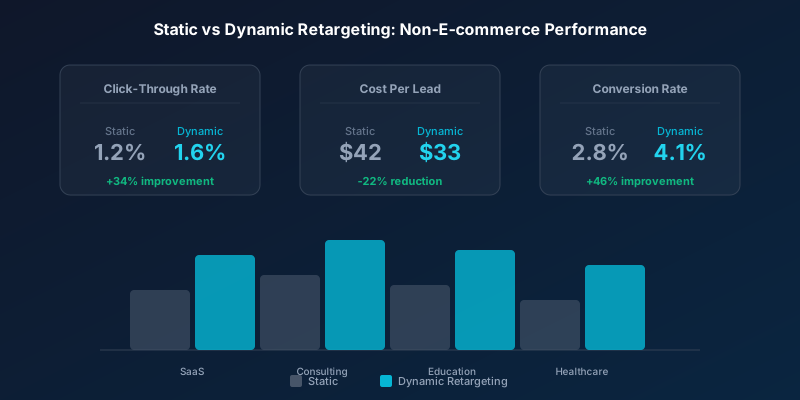
Businesses using personalized dynamic retargeting see 34% higher click-through rates and 22% lower cost per lead compared to static retargeting campaigns, even outside e-commerce.
Building a Service Catalog for Dynamic Ads
Meta's dynamic ads require a catalog, but that catalog does not have to contain physical products. You can create a catalog of services, plans, content categories, or solution areas. Each item in your catalog represents a distinct offering that a visitor might have shown interest in.
| Business Type | Catalog Items | Personalization Signal |
|---|---|---|
| SaaS Company | Pricing plans, feature sets, use cases | Pages viewed, demo requests started |
| Consulting Firm | Service lines, industry specialties | Case studies viewed, contact page visits |
| Education/Training | Courses, certifications, programs | Course pages browsed, enrollment started |
| Healthcare Provider | Specialties, treatments, locations | Service pages viewed, appointment attempts |
| Real Estate Agency | Property types, neighborhoods, price ranges | Listing views, saved searches |
| Financial Services | Products (loans, insurance, accounts) | Calculator usage, application starts |
Setting Up a Non-Product Catalog
In Meta Commerce Manager, create a catalog and select the category that best fits your business. If none of the predefined categories match, use the generic catalog option. Each item needs an ID, name, description, image URL, and landing page URL. Map these to your service offerings.
- Create a spreadsheet with one row per service, plan, or content category
- Assign a unique ID to each item that matches the content IDs on your website
- Write compelling titles and descriptions focused on benefits rather than features
- Include high-quality images for each catalog item sized at 1200x628 pixels
- Upload the catalog feed to Meta Commerce Manager as a CSV or connect via API
- Install pixel events that fire the ViewContent event with matching content IDs when users browse relevant pages
Pixel Events for Non-E-commerce Dynamic Retargeting
The Meta Pixel needs to pass content IDs that match your catalog items. For e-commerce, this happens automatically with product page views. For non-ecommerce businesses, you need to manually configure which pages trigger which content IDs.
Map your key pages to standard events with appropriate content IDs. A pricing page view triggers ViewContent with the plan ID. A demo request form submission triggers InitiateCheckout. A completed lead form triggers Purchase or Lead. This mapping tells Meta which catalog items each visitor showed interest in.
Use the Meta Pixel Helper browser extension to verify that your events are firing correctly with the right content IDs. Mismatched IDs between your pixel and catalog will cause dynamic ads to show irrelevant items or fail to personalize at all.
Creative Strategies for Service-Based Dynamic Ads
Stop wasting ad budget
NovaStorm AI cuts Meta Ads CPA by 40% on average. Start free.
Dynamic retargeting for non-ecommerce requires different creative approaches than product retargeting. You cannot simply show a photo of a service. Instead, focus on outcomes, social proof, and benefit-driven messaging that relates to what the visitor explored.
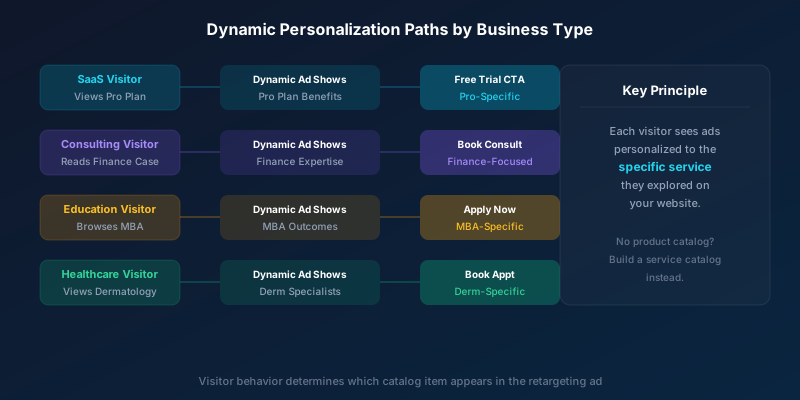
- Use outcome imagery: show the result of using your service rather than the service itself
- Include industry-specific social proof: match testimonials to the visitor's browsed category
- Feature plan-specific value propositions: highlight the benefits of the exact plan they explored
- Add dynamic headlines using catalog fields: pull in service names and key stats automatically
- Create multiple creative templates: let Meta optimize which template performs best per audience segment
Campaign Structure for Non-E-commerce Dynamic Retargeting
Structure your campaigns to separate high-intent and low-intent visitors. Someone who started a demo request but did not finish represents much higher intent than someone who briefly visited your homepage. These audiences should see different ad intensities and messaging.
| Audience Tier | Behavior Signal | Ad Strategy | Budget Allocation |
|---|---|---|---|
| Hot Leads | Form started, demo requested | Direct CTA with incentive | 40% of retargeting budget |
| Warm Prospects | Service pages viewed, case studies read | Benefit-focused dynamic ads | 35% of retargeting budget |
| Cool Visitors | Homepage or blog only | Educational content, brand building | 25% of retargeting budget |
Use Advantage+ catalog ads (formerly dynamic ads) with your service catalog. Set up audience segmentation based on pixel events and create separate ad sets for each intent tier. This ensures your budget concentrates on the visitors most likely to convert.
Measuring Dynamic Retargeting Without Purchase Events
Without a clear purchase event, measuring dynamic retargeting non-ecommerce performance requires custom conversion tracking. Define what constitutes a conversion for your business and configure Meta to optimize toward that event.
- Lead form submissions as primary conversion event
- Demo or consultation bookings as high-value conversion
- Phone calls tracked via click-to-call events
- Content downloads or gated resource access
- Free trial signups or account creation
- Micro-conversions like email signups as secondary metrics
Assign values to each conversion type so Meta can optimize for total value rather than just volume. A demo booking might be worth ten times an email signup. Feeding this value data back to Meta improves the algorithm's ability to allocate budget toward the highest-value outcomes.
Automating Non-E-commerce Retargeting at Scale
Managing service catalogs, pixel event mappings, and audience tiers manually becomes complex as your offerings grow. AI-powered campaign management tools can monitor dynamic ad performance, automatically adjust catalog item bids based on lead quality, and flag when specific service categories underperform.
The combination of a well-structured service catalog, properly configured pixel events, and automated optimization creates a dynamic retargeting engine that rivals anything an e-commerce brand can deploy. The technology is the same. Only the catalog contents differ. Non-e-commerce businesses that embrace this approach gain a significant competitive advantage in their retargeting effectiveness.
Novastorm AI automates Meta Ads routine — from monitoring to optimization. Learn more at novastorm.ai
Disclaimer: This article was generated with the assistance of AI and reviewed by the NovaStorm AI team. While we strive for accuracy, we recommend verifying specific data points and consulting official sources (linked where available) for critical business decisions.
Ready to automate your Meta Ads?
NovaStorm AI takes full responsibility for your campaigns — from monitoring to optimization.
Get Started FreeRelated Articles
Sales and Marketing Alignment Through Meta Lead Ads
Learn how sales marketing alignment Meta Lead Ads strategies bridge the gap between teams, improve lead quality, and drive revenue growth in B2B organizations.
B2B Retargeting Strategies on Meta Ads
Master B2B retargeting strategies on Meta Ads with segmented audiences, sequential messaging, and pipeline-driven optimization. Reduce cost per SQL by 40-60%.
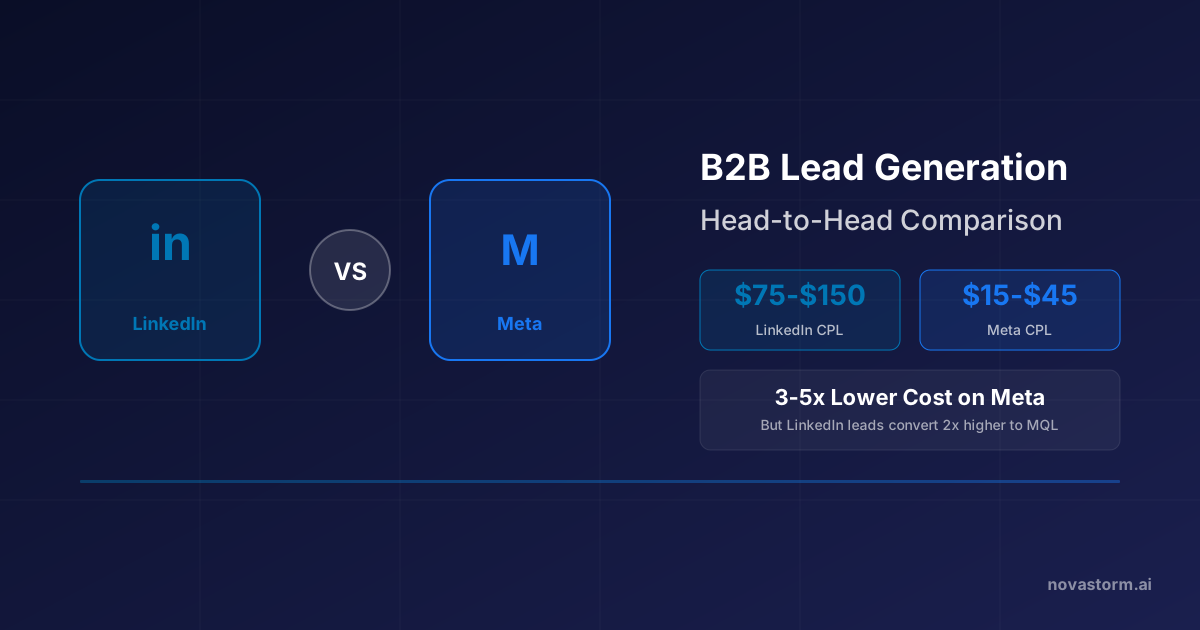
LinkedIn vs Meta for B2B Lead Generation: Head-to-Head Comparison
LinkedIn vs Meta for B2B lead generation compared across CPL, targeting, volume, and conversion rates. Data-driven breakdown to optimize your B2B ad spend.