Auto-Rules in Meta Ads: Automate Without Losing Control
Set up auto-rules in Meta Ads to automate budget scaling, pausing underperformers, and notifications. Learn the top 5 rules every account needs and common pitfalls to avoid.
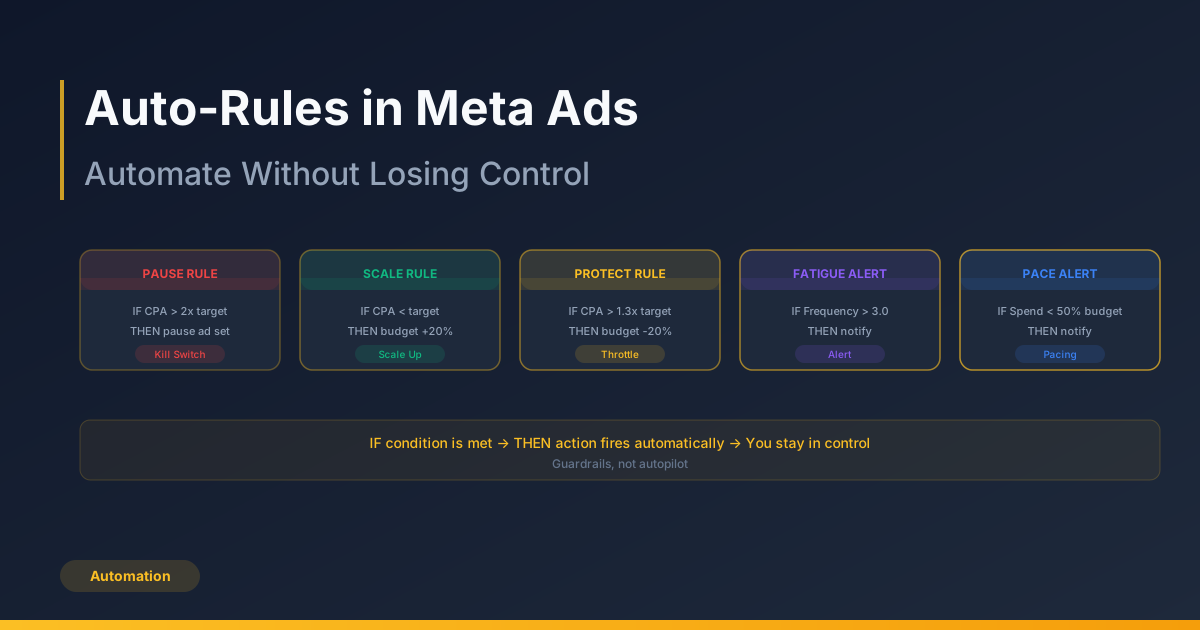
Auto-rules in Meta Ads let you set conditions that trigger automatic actions — scaling budgets, pausing underperformers, or sending alerts — without manual intervention. For advertisers managing multiple campaigns, rules are the bridge between hands-on management and scalable automation. The key is building rules that enhance your strategy rather than replacing your judgment.
What Auto-Rules Are and How They Work
Auto-rules are conditional automation scripts built into Meta Ads Manager. You define a condition (if CPA exceeds a threshold), an action (pause the ad set), and a schedule (check every 30 minutes, daily, or on a custom schedule). When the condition is met, Meta executes the action automatically.
Rules can be applied at the campaign, ad set, or ad level. They evaluate performance based on the time window you specify — today, yesterday, last 3 days, last 7 days, or a custom range. The time window is critical: too short and rules react to noise; too long and they respond too slowly.
Top 5 Auto-Rules Every Meta Ads Account Needs
1. Kill Switch: Pause High-CPA Ad Sets
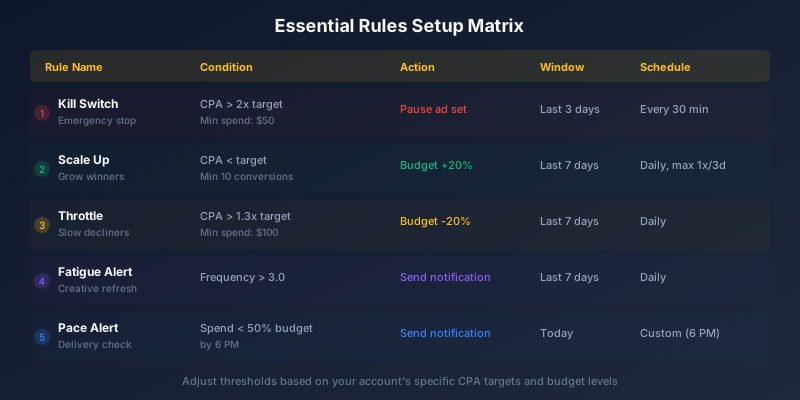
This rule protects your budget from runaway costs. Set it to pause any ad set where CPA exceeds 2x your target over the last 3 days, with a minimum spend threshold to avoid premature pausing. This prevents you from burning budget overnight on a sudden performance drop.
2. Budget Scaling: Increase Budget on Winners
When an ad set consistently delivers results below your target CPA, automatically increase its daily budget by 20 percent. Set this to evaluate over the last 7 days and limit increases to once every 3 days to prevent over-scaling. Cap the maximum budget to maintain control.
3. Budget Protection: Decrease Budget on Decliners
The inverse of the scaling rule. If CPA rises above your target by 30 percent over the last 7 days, reduce budget by 20 percent. This gradually throttles underperformers rather than killing them outright, giving the algorithm a chance to recover.
4. Creative Fatigue Alert
Set a notification rule that alerts you when frequency exceeds 3.0 over the last 7 days. High frequency signals that your audience is seeing the same ads too often, leading to creative fatigue. This rule does not take action — it notifies you so you can decide whether to refresh creative.
5. Spend Pacing Alert
Create a notification when daily spend is less than 50 percent of the daily budget by 6 PM. Significant underspend indicates a delivery issue — targeting too narrow, bid too low, or creative rejected. Early alerts let you investigate and fix problems the same day.
Stop wasting ad budget
NovaStorm AI cuts Meta Ads CPA by 40% on average. Start free.
Custom Metric Conditions
Beyond standard metrics like CPA and ROAS, you can build rules using custom metric combinations. For example, you might create a rule that pauses ads when CTR drops below 1 percent AND spend exceeds a certain amount — combining engagement and cost signals for smarter automation.
| Condition | Metric | Window | Action |
|---|---|---|---|
| CPA too high | Cost per result > 2x target | Last 3 days | Pause ad set |
| CPA profitable | Cost per result < target CPA | Last 7 days | Increase budget 20% |
| CPA rising | Cost per result > 1.3x target | Last 7 days | Decrease budget 20% |
| Fatigue detected | Frequency > 3.0 | Last 7 days | Send notification |
| Underspend | Spend < 50% of budget | Today | Send notification |
| Low engagement | CTR < 0.5% | Last 3 days | Pause ad |
Rule Scheduling: When Rules Should Run
Pause rules should run frequently — every 30 minutes is not too often for high-spend accounts. Budget adjustment rules should run less frequently, typically once per day, to avoid compounding changes. Notification rules depend on urgency: spend pacing alerts should run mid-day, while weekly performance summaries can run on Monday mornings.
Always include a minimum spend or minimum impressions threshold in your rules. A rule that pauses an ad set after 10 dollars of spend because CPA is high is reacting to insufficient data. Set minimums that ensure the data is meaningful before actions are triggered.
Common Auto-Rule Pitfalls
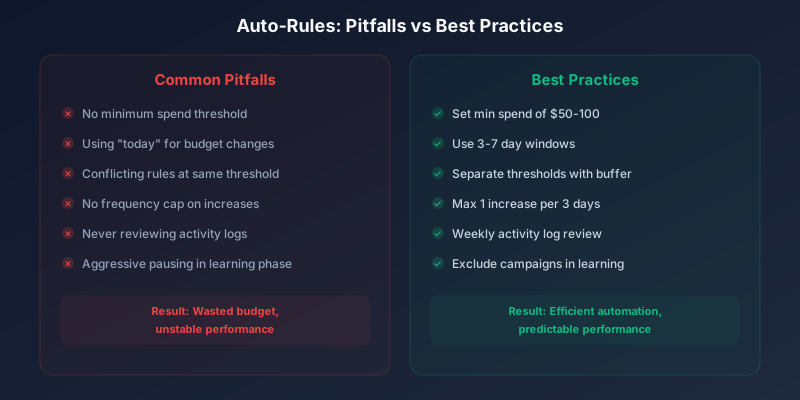
- Setting rules with no minimum spend threshold — leading to premature actions on insufficient data.
- Using 'today' as the lookback window for budget changes — same-day data is too volatile for reliable decisions.
- Stacking multiple rules that conflict — one rule increases budget while another decreases it at the same thresholds.
- Forgetting to set frequency caps on budget increases — a 20 percent increase every day compounds rapidly.
- Not reviewing rule activity logs — rules may be firing more often than expected.
- Setting aggressive pause rules during the learning phase — new campaigns need time to stabilize.
Review your rule activity log weekly. Go to Ads Manager, click Rules, then Activity. This shows every action every rule has taken, helping you spot rules that are firing too aggressively or not at all.
Sources & Further Reading: Meta Business Help Center — Automated Rules — official documentation on auto-rules. AdEspresso — Facebook Automated Rules Guide — setup walkthroughs and best practices. Hootsuite — Facebook Ads Manager Guide — comprehensive overview including automation features.
Auto-rules are guardrails, not autopilot. They handle the repetitive checks and routine actions so you can focus on strategy, creative development, and the decisions that truly require human judgment.
Auto-rules transform Meta Ads management from reactive firefighting into proactive automation. Start with the five essential rules above, monitor their impact for two weeks, and then refine thresholds based on your account's specific patterns. The goal is not to remove yourself from the process — it is to ensure the process runs smoothly even when you are not watching.
Novastorm AI automates Meta Ads routine — from monitoring to optimization. Learn more at novastorm.ai
Disclaimer: This article was generated with the assistance of AI and reviewed by the NovaStorm AI team. While we strive for accuracy, we recommend verifying specific data points and consulting official sources (linked where available) for critical business decisions.
Ready to automate your Meta Ads?
NovaStorm AI takes full responsibility for your campaigns — from monitoring to optimization.
Get Started FreeRelated Articles
Meta Advantage Suite: Complete Guide to All Automation Tools
Master every tool in the Meta Advantage Suite. Learn when to enable Advantage Campaign, Creative, Audience, Placements, and Shopping for maximum ad performance.
The Future of Meta Ads: AI, Privacy, and Automation Trends
Explore the future of Meta Ads shaped by AI automation, evolving privacy regulations, and machine learning. Discover key trends redefining paid social in 2026.
Meta Marketing API: Automating Campaign Management at Scale
Learn how to use the Meta Marketing API to automate campaign management at scale. Covers authentication, bulk operations, and real-world automation patterns.