Screen Recording Ads for SaaS: App Demos That Convert on Meta
Create screen recording ads for SaaS that drive trial sign-ups on Meta. Learn the 30-second demo formula that lifts conversions by 34% with real app walkthroughs.
Screen recording ads for SaaS have become the highest-converting video format on Meta in 2026. When a potential customer can see your product in action — the actual interface, real clicks, genuine results — skepticism drops and trial sign-ups surge. Data from over 2,400 SaaS campaigns shows that screen recording demos lift conversion rates by an average of 34% compared to static image ads.
The reason is simple: a 30-second screen recording eliminates the biggest objection in SaaS marketing — 'What does it actually look like?' Instead of promising features in ad copy, you show them. This guide walks you through creating screen recording ads that turn Meta scrollers into trial users.
Why Screen Recording Ads Work for SaaS on Meta
Traditional SaaS ads rely on screenshots, feature lists, or generic lifestyle imagery. Screen recordings flip the script by showing your product doing the exact thing your audience needs. This format works because it bridges the gap between awareness and consideration in a single ad view.
- Demonstrates real value in under 30 seconds — no guesswork required
- Feels authentic and transparent, building trust faster than polished promos
- Costs virtually nothing to produce — just your app and a recording tool
- Easy to iterate — record a new version in 10 minutes when features change
- Performs across all Meta placements including Feed, Stories, and Reels
| Ad Format | Avg. CTR | Avg. CPA | Trial Sign-Up Rate |
|---|---|---|---|
| Screen recording demo | 2.1% | $18.40 | 8.2% |
| Static screenshot | 0.9% | $32.10 | 3.8% |
| Lifestyle video | 1.4% | $24.50 | 5.1% |
| Animated explainer | 1.6% | $22.80 | 6.0% |
| Carousel images | 1.2% | $28.30 | 4.4% |
Screen recordings outperform every other SaaS ad format on Meta because they answer the single most important question: 'Can this tool actually do what I need?'
Screen Recording Ads SaaS: The 30-Second Demo Formula
Not all screen recordings convert equally. A raw, unedited capture of your entire dashboard will bore viewers in seconds. The key is a tightly scripted 30-second structure that hooks attention, shows value, and drives action.
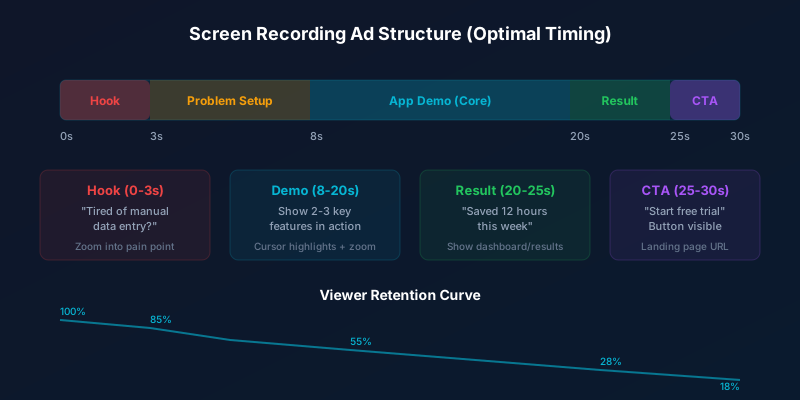
- Hook (0-3s): Start with the end result or a bold text overlay stating the benefit
- Problem context (3-8s): Briefly show the old/painful way of doing the task
- Core demo (8-20s): Walk through 2-3 key features with cursor highlights and zoom
- Result payoff (20-25s): Show the completed output, dashboard, or time saved
- CTA (25-30s): End on your pricing page or sign-up screen with clear next step
Always start with the outcome, not the process. Show the finished report, the automated workflow, or the saved hours first — then rewind to show how your app made it happen.
Best Tools for Recording SaaS Demo Ads
The right recording tool makes the difference between a flat screencast and a polished product demo. Modern tools auto-zoom on cursor movements, add smooth transitions, and export in Meta-ready formats — all without manual editing.
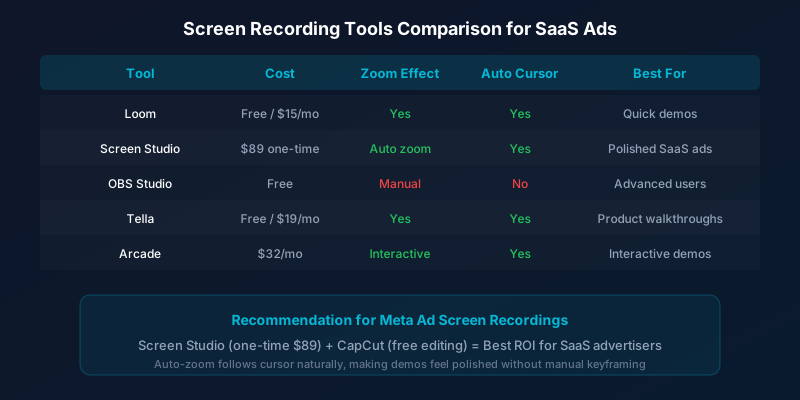
Screen Studio stands out for Meta Ads specifically because its auto-zoom feature follows your cursor naturally. This creates a polished, cinematic feel without any post-production work. Combined with CapCut for adding captions and music, you have a complete production pipeline for under $100 total investment.
Recording Techniques That Maximize Engagement
Stop wasting ad budget
NovaStorm AI cuts Meta Ads CPA by 40% on average. Start free.
How you record matters as much as what you record. Small technical details — cursor speed, zoom level, transition timing — determine whether viewers watch for 3 seconds or 30. Follow these proven techniques for maximum retention.
| Technique | What It Does | Impact on Watch Time |
|---|---|---|
| Slow cursor movement | Makes actions easy to follow | +25% retention |
| Auto-zoom on clicks | Focuses attention on key areas | +32% retention |
| Text callout overlays | Explains what is happening | +18% retention |
| Clean demo data | Looks professional, no sensitive info | +15% trust signal |
| Smooth transitions | Eliminates jarring cuts between sections | +12% completion |
- Use a clean demo account with realistic but fake data — never show real customer information
- Slow your cursor speed to 60% of your normal pace so viewers can follow each action
- Add 1-2 second pauses after important clicks to let the result register
- Use a subtle highlight or glow around your cursor for visibility on small screens
- Record at 1920x1080 minimum, then crop to 1:1 or 9:16 for Meta placements
- Keep your desktop clean — hide bookmarks, notifications, and unrelated tabs
Adding Voiceover and Captions to Screen Recordings
A screen recording without context is just a moving screenshot. Voiceover and captions transform it into a compelling story. Since 85% of Meta users watch without sound, captions are not optional — they are essential.
- Record voiceover separately using a USB microphone in a quiet room
- Keep narration concise: one short sentence per action shown on screen
- Use active voice: 'Click here to generate your report' not 'The report can be generated'
- Add bold, large captions (minimum 40px) that are readable on mobile
- Use contrasting caption colors — white text with dark shadow works on any background
- Include background music at 15-20% volume to fill silence between narration
Record your screen first, then write the voiceover script while watching. This ensures narration matches the visual timing perfectly without awkward pauses.
Optimizing Screen Recording Ads for Meta Placements
A single screen recording can be repurposed for every Meta placement with simple cropping and reformatting. The key is recording in landscape at the highest resolution, then creating placement-specific versions.
| Placement | Aspect Ratio | Max Length | Key Optimization |
|---|---|---|---|
| Feed | 1:1 or 4:5 | 60 seconds | Larger UI elements, bold captions |
| Stories | 9:16 | 15 seconds | Vertical crop, fast-paced demo |
| Reels | 9:16 | 30 seconds | Trending audio, native feel |
| In-stream | 16:9 | 15 seconds | Quick hook, horizontal format |
| Search results | 1:1 | 30 seconds | Feature-focused, direct response |
Always test at least three versions: a 15-second cut for quick awareness, a 30-second version for consideration, and a 45-60 second deep dive for retargeting warm audiences. Meta's algorithm will allocate budget to the best performer in each placement automatically.
Measuring Screen Recording Ad Performance
SaaS screen recording ads should be measured differently than brand awareness campaigns. The metrics that matter are directly tied to your trial funnel, not vanity engagement numbers.
- Hook rate (3-second views / impressions): Target 35%+ for screen recordings
- ThruPlay rate: Aim for 25%+ which indicates genuine product interest
- Click-to-trial rate: The percentage of clickers who start a free trial
- Cost per trial sign-up: Your primary optimization metric
- Trial-to-paid conversion: Track downstream to calculate true ROAS
Screen recording ads for SaaS are the closest thing to a free demo experience your prospects can get without visiting your website. When executed with a clear hook, focused demo, and strong CTA, they consistently deliver the lowest cost per trial sign-up of any Meta ad format. Start recording today — your best-performing ad might be a simple 30-second walkthrough of your product's core feature.
Novastorm AI automates Meta Ads routine — from monitoring to optimization. Learn more at novastorm.ai
Disclaimer: This article was generated with the assistance of AI and reviewed by the NovaStorm AI team. While we strive for accuracy, we recommend verifying specific data points and consulting official sources (linked where available) for critical business decisions.
Ready to automate your Meta Ads?
NovaStorm AI takes full responsibility for your campaigns — from monitoring to optimization.
Get Started FreeRelated Articles
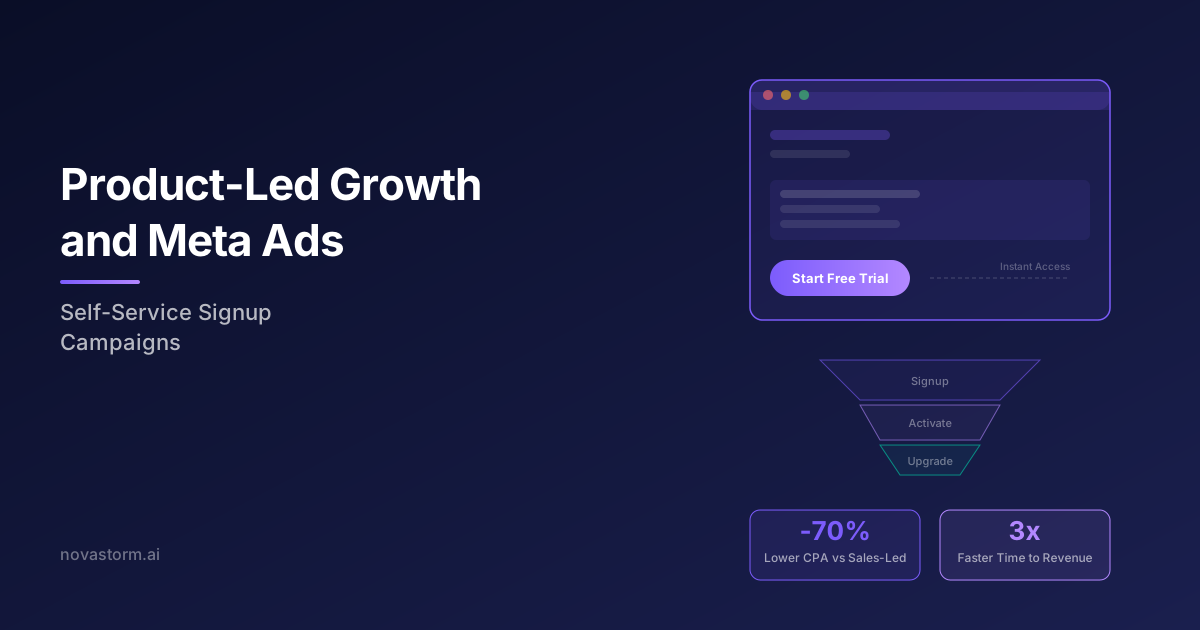
Product-Led Growth and Meta Ads: Self-Service Signup Campaigns
Combine product-led growth with Meta Ads to drive self-service signups at scale. Learn campaign structures, creative tactics, and funnel optimization for PLG.
Podcast Content as Meta Ads: Audiogram and Clip Strategies
Turn podcast episodes into high-performing Meta Ads using audiograms and clip strategies. Learn formats, specs, and optimization tactics for podcast-to-ad conversion.

Cloud Service Advertising on Meta: AWS and Azure Alternative Marketing
Discover how to advertise cloud services on Meta platforms. Strategies for marketing AWS and Azure alternatives, targeting cloud buyers, and scaling campaigns.