Meta Ads Budget Calculator: How to Set Your Monthly Ad Spend
Learn how to calculate your ideal Meta Ads budget with our step-by-step framework. Set monthly ad spend based on revenue goals, margins, and target ROAS.
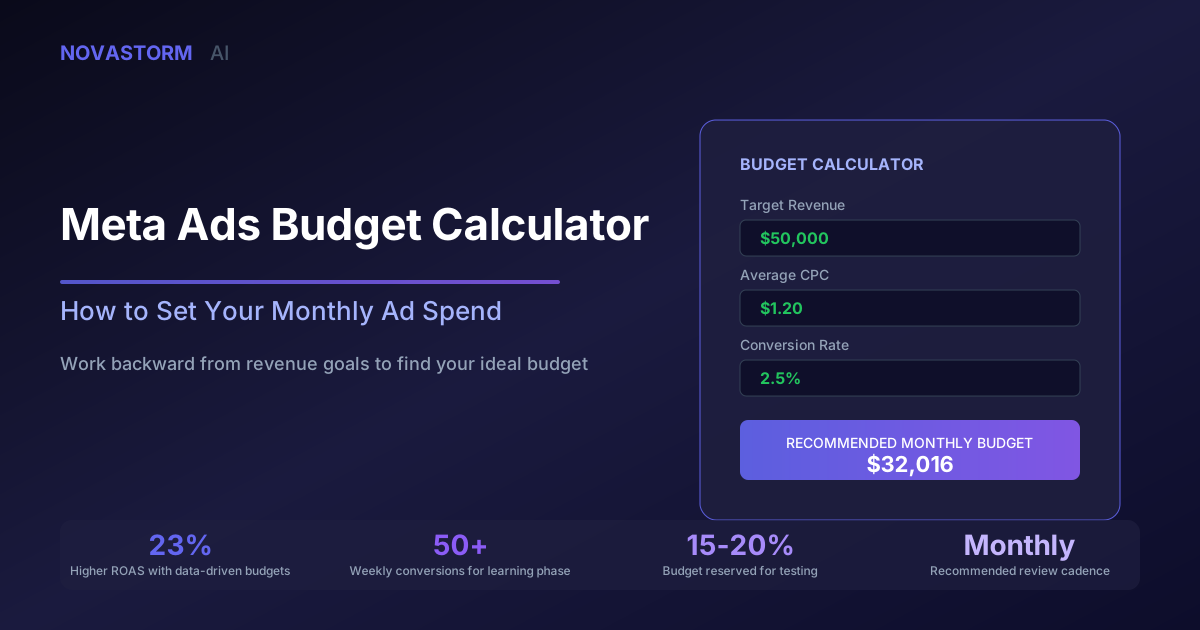
Setting the right monthly budget for Meta Ads is one of the most consequential decisions in performance marketing. Spend too little and your campaigns starve for data. Spend too much without the right controls and you hemorrhage cash. A Meta Ads budget calculator gives you a structured way to land on a number that actually aligns with your business goals.
This guide walks you through a proven framework for calculating your Meta Ads budget from scratch. Whether you are launching your first campaign or recalibrating after a quarter of inconsistent results, these formulas will anchor your spend to real business metrics.
Why You Need a Meta Ads Budget Calculator
Most advertisers pick a budget based on gut feeling or whatever they spent last month. That approach leads to chronic underfunding of winning campaigns and overfunding of losers. A Meta Ads budget calculator replaces guesswork with arithmetic tied to revenue targets, profit margins, and historical performance data.
The core idea is simple: work backward from what you want to achieve. If you know your target revenue, your average order value, your conversion rate, and your cost per acquisition, the monthly budget calculates itself.
Companies that use data-driven budget frameworks report 23% higher ROAS compared to those setting budgets based on intuition alone.
The Revenue-Based Budget Formula
Start with the formula that ties ad spend directly to your revenue goals. This is the most reliable Meta Ads budget calculator approach for established businesses with historical data.
| Variable | Description | Example |
|---|---|---|
| Target Monthly Revenue | Revenue goal from Meta Ads | $50,000 |
| Average Order Value (AOV) | Revenue per transaction | $75 |
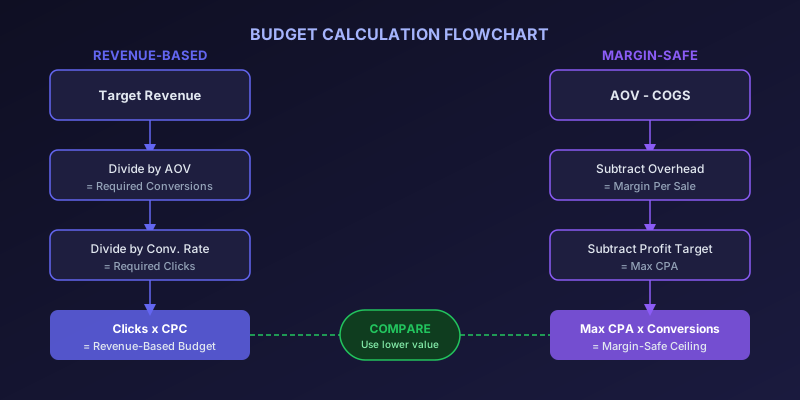
| Required Conversions | Revenue / AOV | 667 |
| Historical Conversion Rate | Purchases / clicks | 2.5% |
| Required Clicks | Conversions / conversion rate | 26,680 |
| Average CPC | Cost per click from past data | $1.20 |
| Monthly Budget | Clicks x CPC | $32,016 |
This formula gives you a grounded starting point. The key inputs are your historical CPC and conversion rate. If you lack historical data, use industry benchmarks and plan for a testing phase in your first 30 days.
The Margin-Safe Budget Calculation
Revenue-based budgeting tells you what you could spend. Margin-safe budgeting tells you what you should spend. This second layer of the Meta Ads budget calculator ensures your ad spend never erodes profitability.
- Calculate your gross margin per sale: AOV minus cost of goods sold
- Subtract fulfillment and overhead costs per order
- The remaining amount is your maximum allowable CPA
- Multiply max CPA by your target number of conversions
- That product is your margin-safe monthly budget ceiling
For example, if your AOV is $75, COGS is $30, and per-order overhead is $10, your margin per sale is $35. If you want a 20% net profit, your maximum CPA is $20. Multiply by 667 target conversions and your margin-safe ceiling is $13,340 per month.
If your revenue-based budget exceeds your margin-safe ceiling, you need to either improve conversion rates, lower CPCs through better creative, or adjust revenue expectations.
Adjusting for Funnel Stage and Campaign Type
Your Meta Ads budget calculator should not treat all campaigns equally. Prospecting, retargeting, and retention campaigns have fundamentally different economics. A typical allocation looks like this:
Stop wasting ad budget
NovaStorm AI cuts Meta Ads CPA by 40% on average. Start free.
| Campaign Type | Budget Share | Expected CPA | Role |
|---|---|---|---|
| Prospecting (TOF) | 60-70% | Higher | New audience acquisition |
| Retargeting (MOF) | 20-25% | Medium | Nurturing warm audiences |
| Retention (BOF) | 10-15% | Lowest | Re-engaging past buyers |
Prospecting takes the largest share because it feeds the entire funnel. However, blended CPA across all stages should still fall within your margin-safe ceiling. Use your Meta Ads budget calculator at both the total and campaign-type level.
The Testing Budget Component
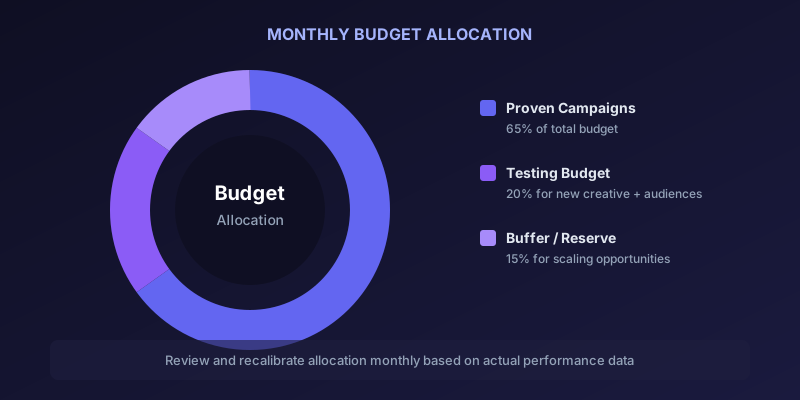
Every monthly budget should include a dedicated testing allocation. Without it, you are optimizing within a shrinking window of creative and audience fatigue. Industry best practice is to allocate 15-20% of your total budget to testing.
- Creative testing: new ad formats, copy angles, visual styles
- Audience testing: new interest groups, lookalike seeds, broad targeting
- Placement testing: Reels, Stories, Feed, Audience Network comparisons
- Offer testing: different promotions, bundles, pricing strategies
Your Meta Ads budget calculator should carve out this testing budget before allocating the rest to proven campaigns. Think of it as an investment in future performance rather than current-month revenue.
Monthly Budget Review Cadence
A budget set once and forgotten is a budget that drifts from reality. Build a monthly review process into your workflow that recalibrates the key inputs of your Meta Ads budget calculator.
- Week 1: Review previous month's actual CPC, conversion rate, and CPA
- Week 1: Update your calculator inputs with fresh data
- Week 2: Compare calculated budget against margin-safe ceiling
- Week 2: Adjust campaign-level allocations based on performance
- Week 3-4: Monitor pacing and adjust daily caps if needed
Seasonal fluctuations, competitive shifts, and algorithm changes all affect your underlying metrics. A static budget becomes inaccurate within 60 days for most advertisers.
Common Meta Ads Budget Calculator Mistakes
Even with a calculator framework, advertisers make systematic errors that undermine their budgeting accuracy. Avoid these pitfalls:
| Mistake | Impact | Fix |
|---|---|---|
| Using platform-reported revenue only | Overestimates ROAS by 15-30% | Cross-reference with actual sales data |
| Ignoring attribution lag | Premature budget cuts on winning campaigns | Wait 7 days before judging new spend |
| Setting budget below learning phase threshold | Campaigns never optimize | Ensure 50 conversions per week minimum |
| Not accounting for seasonality | Budget misaligned with demand | Build seasonal multipliers into calculator |
| Treating all products equally | Subsidizing low-margin items | Calculate budget per product category |
Run your Meta Ads budget calculator monthly and compare predicted versus actual results. The gap between forecast and reality reveals where your assumptions need updating.
Budget calculation is not a one-time exercise. It is an ongoing discipline that separates profitable advertisers from those who simply spend. Build the habit, refine the inputs, and let the math guide your decisions rather than emotions or competitive pressure.
Novastorm AI automates Meta Ads routine — from monitoring to optimization. Learn more at novastorm.ai
Disclaimer: This article was generated with the assistance of AI and reviewed by the NovaStorm AI team. While we strive for accuracy, we recommend verifying specific data points and consulting official sources (linked where available) for critical business decisions.
Ready to automate your Meta Ads?
NovaStorm AI takes full responsibility for your campaigns — from monitoring to optimization.
Get Started FreeRelated Articles

Building a Media Buying Side Hustle: From Employee to Freelancer
Step-by-step guide to building a media buying side hustle while employed. Covers pricing, client acquisition, legal setup, and scaling strategies.

Media Buying Certifications Worth Getting: Meta Blueprint and Beyond
Compare the best media buying certifications in 2026. Includes Meta Blueprint, Google Ads, TikTok Academy, and more with ROI analysis for each.

Performance Marketing Interview Questions: Hiring the Right Buyer
Discover the best performance marketing interview questions to hire top media buyers. Covers technical skills, platform knowledge, and strategic thinking.